 Abdur Rouf
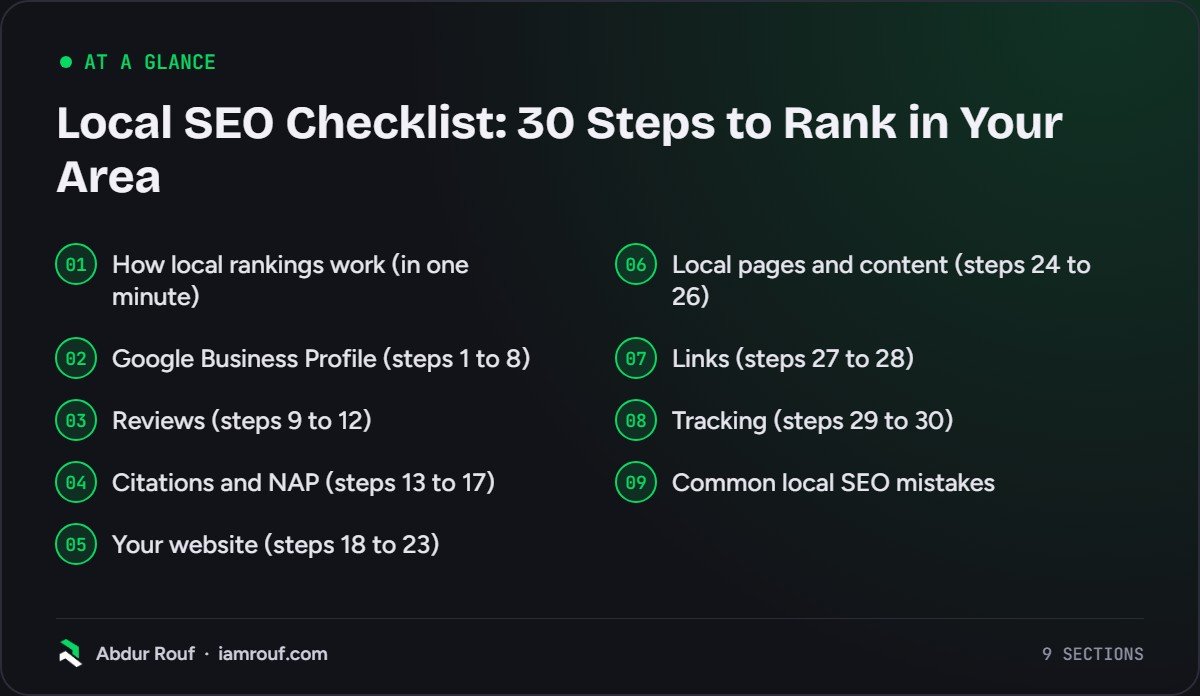
A local SEO checklist is a list of the jobs that help a business show up when people nearby search for what it sells, in Google Maps and in the local results on Google Search. This one has 30 steps in seven groups: Google Business Profile, reviews, citations, your website, local pages, links and tracking.
Each step says what to do and why it matters. Most of it costs nothing but time, and you can do it yourself.
If you only have an afternoon, do steps 1 to 8 first. Your Business Profile is the thing local searchers see before anything else.
How local rankings work (in one minute)
Google says local results are based mainly on three things: relevance, distance and prominence. Its help page on improving your local ranking explains each one, and also states plainly that you cannot request or pay for a better local ranking.
- Relevance is how well your profile matches what someone searched for. Complete, detailed information helps here.
- Distance is how far you are from the person searching. If they do not share their location, Google uses what it knows about it. You cannot change this one.
- Prominence is how well known your business is. Google lists links to your business and the number of reviews you have among the signals.
Every step below feeds one of those three. Here is how the checklist is grouped.
| Group | Steps | What it mainly helps |
|---|---|---|
| Google Business Profile | 1 to 8 | Relevance |
| Reviews | 9 to 12 | Prominence and clicks |
| Citations and NAP | 13 to 17 | Trust in your details |
| Your website | 18 to 23 | Relevance and conversions |
| Local pages and content | 24 to 26 | Relevance |
| Links | 27 to 28 | Prominence |
| Tracking | 29 to 30 | Knowing what works |
Google Business Profile (steps 1 to 8)
Your profile is the box that appears in Maps and in the local pack. It is free, and it is often the first thing a local customer sees, before your website. My guide on how to optimise your Google Business Profile goes through every field in detail; these are the essentials.
1. Claim and verify your profile
Search for your business on Google or go to business.google.com and claim the listing, or create one if none exists. Then verify it. Google’s ranking help page says verification shows Google you are authorised to represent the business. You also need a verified profile before you can reply to reviews, and your photos only appear on Google after verification.
2. Use your real business name
Your profile name should match the name on your sign, your website and your invoices. Google’s guidelines for representing your business do not allow taglines, service descriptions or locations added to the name, and say extra information can get a profile suspended. “Smith Plumbing” is fine. “Smith Plumbing Emergency Plumber Leeds” is not.
3. Pick the most specific primary category
The primary category tells Google what your business is, so it shapes which searches you can appear for. Google’s guidelines suggest testing it with “this business IS a…”, and choosing the fewest categories that describe the core business. Add secondary categories only where they are genuinely true.
4. Set your address or service area correctly
If customers visit you, show the full address with Line 2 for any unit number. If you go to customers and do not serve them at your premises (a plumber working from home, for example), Google’s guidelines for representing your business say to hide the address and set a service area. The same guidelines say a service area should generally not stretch beyond about 2 hours’ driving time from your base.
5. Add regular and special hours
Enter the hours customers can actually reach you, then add special hours for bank holidays and closures. Wrong hours lead to wasted trips and angry reviews, which is the opposite of what you want.
6. Write a plain, factual description
You get up to 750 characters, according to Google’s page on editing your Business Profile. Say what you do, who for, where, and what makes you different. Links are not allowed, and the description should be about the business rather than prices or offers.
7. Fill in services, products and attributes
Add every service you want to be found for, with a short description each. Add products if they apply to you, and tick the attributes that are true (wheelchair access, free Wi-Fi and so on). Not every field is available to every business or country, so fill in what you are offered.
8. Upload real photos and post updates
Add your logo, a cover photo, the outside of your premises, your team and your work. Real photos of real jobs beat stock images every time. Then post an update or offer when you have something worth saying, such as a new service, a seasonal opening time or a recent project.
Reviews (steps 9 to 12)
Google’s ranking help page says more reviews and positive ratings can help local ranking. Reviews also decide which business people choose once they see the local pack.
9. Build asking for reviews into your routine
Ask at the moment the customer is happiest: when the job is finished, the order arrives or they thank you. Make it easy. Google lets you create a review link and QR code from your profile, which you can send by email or text, print on receipts or show at the counter.
10. Never offer incentives or filter who you ask
Google treats discounts or freebies in exchange for reviews as fake engagement, and its policy also rules out selectively asking only happy customers. Ask everyone the same way. Google’s policy says incentivised reviews are removed, so a shortcut here can wipe out the reviews it brought in.
11. Reply to reviews, good and bad
Thank people specifically, not with the same line each time. For negative reviews, stay calm, acknowledge the problem, say what you have done about it and offer a way to talk offline. Future customers read your replies as much as the reviews.
12. Flag reviews that break Google’s policies
If a review is fake, offensive or clearly about another business, report it from your profile. Google will not remove a review just because it is negative, so save flags for genuine policy breaches.
Citations and NAP (steps 13 to 17)
A citation is any mention of your business name, address and phone number (NAP) online: directories, social profiles, maps apps, review sites. Consistent citations help Google and customers trust that your details are correct.
13. Decide your exact NAP and write it down
Agree one version of your business name, address and main phone number, and use it everywhere. Keep it in a shared document so staff, agencies and freelancers all copy the same thing.
14. Claim the big platforms beyond Google
Set up or claim your listings on Apple Business Connect (Apple Maps), Bing Places, Facebook and the main review site for your industry. Customers using Apple Maps, Bing or Facebook to find a local business will see these listings, not your Google profile.
15. Add relevant directories for your country and trade
Add your business to the main general directories in your country, your trade bodies, and directories specific to your industry or town. Quality and relevance matter more than volume. I would rather see a few dozen relevant listings than hundreds of random ones.
16. Find and fix wrong or old listings
Search for your business name, old phone numbers and old addresses. Correct any listings that show outdated details, especially after a move, a rebrand or a change of number.
17. Remove duplicate Google profiles
Google’s guidelines allow one profile per business location. Duplicates split your reviews and confuse Google about which listing is real. If you find one, get it removed through Google Business Profile support rather than leaving two versions live.
Your website (steps 18 to 23)
Your website gives Google the detail your profile cannot hold, and it is where many local searchers decide whether to call. The on-page SEO checklist covers page-level basics; these steps are the local ones.
18. Show your NAP on every page
Put your business name, address (if you show it publicly) and phone number in the footer, and on a contact page with a map and opening hours. Make the phone number tappable on mobile.
19. Link your profile to the right page
A single-location business can link its profile to the homepage. A business with several branches should link each profile to that branch’s own page. Add UTM tags to the link so profile clicks show up separately in your analytics.
20. Add LocalBusiness structured data
Mark up your name, address, phone, hours and URL with schema. Google’s local business structured data documentation lists name and address as required, recommends using the most specific LocalBusiness subtype, and gives JSON-LD examples. Make sure the details match your profile exactly.
21. Put the service and the place in titles and headings
Your key pages should say clearly what you do and where, in the title tag, the H1 and the opening paragraph. “Boiler Repairs in Cardiff” tells searchers and Google far more than “Welcome to our website”.
22. Make the site fast and easy on a phone
Plenty of local searches happen on a phone, often in a hurry. Check that your pages load quickly, the phone number and contact form are easy to reach, and nothing pops up over the content. My technical SEO checklist for small business websites covers speed and mobile in more depth.
23. Research the words local customers actually use
People search for “emergency electrician”, “electrician near me” and “electrician Bristol”, and they may use trade terms you never use yourself. A short round of keyword research tells you which services to build pages for and what to call them.
Local pages and content (steps 24 to 26)
Pages are how you become relevant for more searches. The goal is pages that a real customer would find useful, not pages that only exist to rank.
24. Give each core service its own page
A single “Services” page listing ten things will rarely rank for any of them. A page for each main service, with what it involves, who it is for, rough process, photos and FAQs, gives Google something specific to match against.
25. Build location pages only where you can say something unique
If you serve several towns, a page per area can help, but only if each page has genuinely different content: jobs done there, local details, team members based there, specific reviews. Google’s spam policies name pages targeted at specific cities or regions that funnel users to one page as an example of doorway abuse. Ten copies of one page with the town name swapped are exactly that.
26. Publish content that shows local knowledge
Write about real local questions you get asked: planning rules in your council area, what a typical job costs locally, seasonal problems in your region. Case studies of real local jobs (with the customer’s permission) do two things at once: they prove experience and they mention the places you work.
Links (steps 27 to 28)
Links from other websites are one of the prominence signals Google mentions. For a local business, a handful of relevant local links usually matters more than lots of random ones.
27. Earn links from your local area and trade
Think about who already knows you: suppliers, trade associations, the local chamber of commerce, clubs or events you sponsor, local news sites, partners you work with. Each can be a natural link. My guide to building high-quality backlinks covers outreach in more detail. Avoid buying links; it is a risk with little upside.
28. Link your own pages together
Link from your homepage to your main service and location pages, and between related services. Internal links help Google find your important pages and understand how they relate, and they help visitors too.
Tracking (steps 29 to 30)
Without tracking you cannot tell which of the 28 steps above actually brought in work.
29. Check your Business Profile performance every month
Your profile shows views, the searches people used to find you, calls, direction requests and website clicks. Look at the trend over months rather than reacting to one week, and note what changed when numbers move.
30. Track rankings by location and real enquiries
Local rankings change street by street, so a single rank check from your office tells you little. Use a rank tracker that checks from several points across your area, set up Search Console for your website, and track calls and form submissions as conversions. Enquiries are the number that matters.
Common local SEO mistakes
These come up again and again, and most of them undo good work elsewhere.
- Adding keywords or locations to the business name on the profile.
- Choosing a broad primary category when a more specific one exists.
- Showing a home address publicly when you do not serve customers there.
- Using a virtual office address, which Google’s guidelines say is not eligible.
- Offering discounts for reviews, or only asking happy customers.
- Changing phone numbers or addresses without updating the listings that show the old ones.
- Building dozens of near-identical town pages.
- Judging progress by one ranking checked from one spot.
FAQs
How long does local SEO take to work?
There is no fixed timeline. Fixing your Business Profile can make a visible difference once Google processes the changes, while reviews, links and content build up over months. How fast you move depends on your competitors, how many reviews they have, and how much work your profile and website needed to begin with. Be wary of anyone who promises a ranking by a date.
Can I do local SEO myself?
Yes. Most of this checklist is free and needs no technical skill: completing your profile, asking for reviews, fixing listings and improving your service pages. The harder parts are structured data, location pages that avoid doorway problems, link earning and working out what to prioritise. That is where a specialist saves time, especially in competitive towns or trades.
What is the most important local ranking factor?
Google names relevance, distance and prominence as the main factors. Distance is out of your hands, so for most businesses the biggest wins come from a complete, accurate Business Profile with the right primary category, a steady flow of genuine reviews, and a website with clear service pages. Which of these matters most depends on where you are weakest.
Do I need a website for local SEO?
You can appear in Google Maps with only a Business Profile, but a website helps a lot. It gives Google more information about your services and area, it can rank in the normal results below the map, and it gives customers somewhere to check you out before they call. For competitive searches, businesses without a decent website are usually at a disadvantage.
Want help working through the list?
Thirty steps is a lot to fit around running a business, and some of them are easier with experience. If you would like someone to audit your profile, listings and website and then fix what matters first, have a look at my local SEO services.