 Abdur Rouf
A technical SEO checklist is a list of the behind-the-scenes settings that let search engines crawl, index and load your website properly. This one has 25 checks for small business websites, grouped into crawling, indexing, site structure, speed, mobile, security, structured data and international. Most need only Google Search Console and a website crawler.
It is written as a checklist to keep, not a one-off audit. Each check says what to look at, what good looks like and what tends to go wrong on small sites. Near the end there is a schedule for how often to recheck each group.
If you need a full review that also covers content, links and local signals, start with my SEO audit checklist and come back here for the technical detail.
What technical SEO covers on a small business website
Technical SEO is the part of SEO that deals with how your site works rather than what it says. Content and links decide whether a page deserves to rank. Technical health decides whether Google can find the page, store it and show it to a visitor without problems.
Google’s technical requirements for Search are short: Googlebot must not be blocked, the page must return an HTTP 200 (success) status code, and it must have indexable content. Google also says that meeting these requirements does not guarantee a page will be indexed. Everything below builds on those three basics.
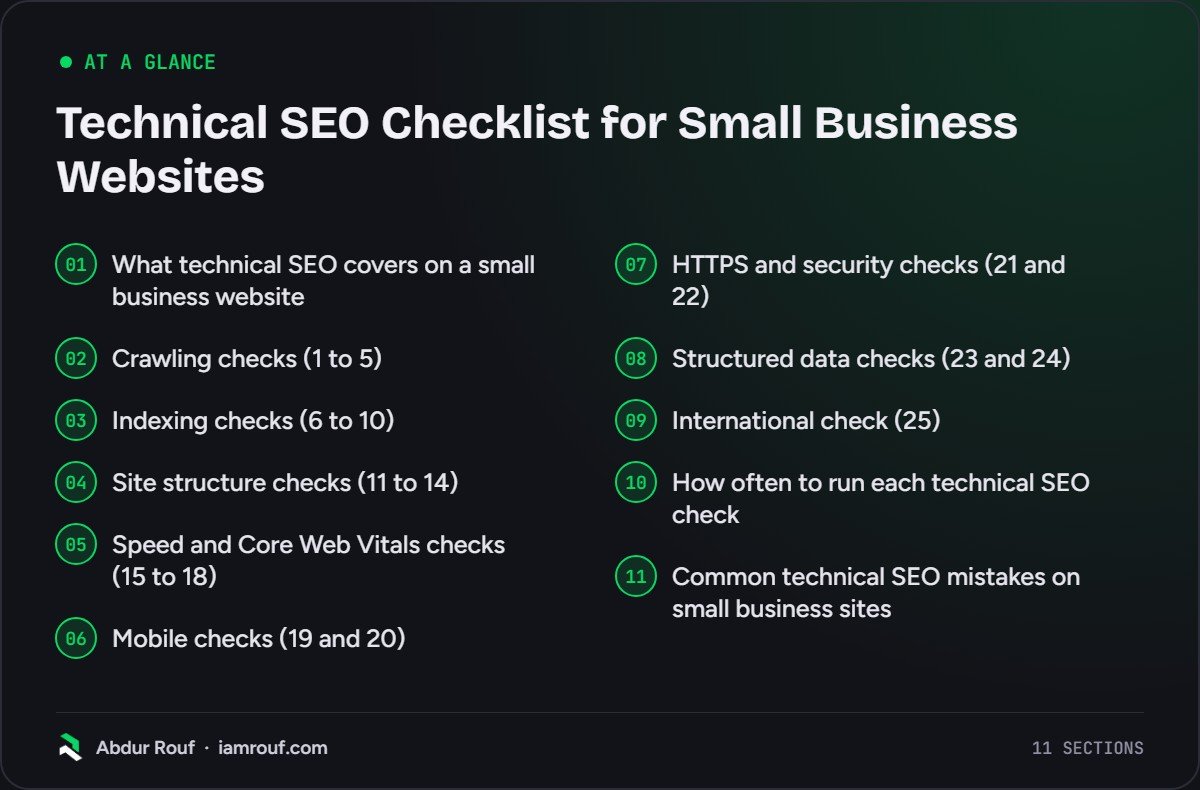
| Group | Checks | What it protects |
|---|---|---|
| Crawling | 1 to 5 | Google can discover and fetch your pages |
| Indexing | 6 to 10 | The right pages are stored, once, under the right URL |
| Site structure | 11 to 14 | Important pages are easy to reach and understand |
| Speed and Core Web Vitals | 15 to 18 | Pages load and respond quickly for real visitors |
| Mobile | 19 and 20 | The phone version is complete and usable |
| HTTPS and security | 21 and 22 | Visitors and search engines can trust the site |
| Structured data | 23 and 24 | Search engines read your business details correctly |
| International | 25 | Language or country versions reach the right people |
Small sites have one advantage here. With a few dozen pages and one or two templates, most fixes take minutes once you know where to look.
Crawling checks (1 to 5)
Crawling is how Google discovers pages, by following links and reading sitemaps. If a page cannot be crawled, nothing else on this list helps it.
1. robots.txt is not blocking pages or files you need
Open yourdomain.com/robots.txt in a browser. Look for Disallow lines that cover service pages, the blog, or folders holding CSS and JavaScript. A leftover “Disallow: /” from a staging site is a classic mistake after a launch, and it blocks everything.
2. An XML sitemap lists only the pages you want indexed
Most content management systems and SEO plugins create a sitemap for you. Open it and check it holds your live, canonical pages and none of the redirected, noindexed or deleted ones. Submit it in the Sitemaps report in Search Console and add a Sitemap line to robots.txt so other search engines find it too.
3. Important pages are reached through normal HTML links
Menus built entirely in JavaScript, buttons that use script instead of a real link, and “load more” sections can hide pages from crawlers. Every page you care about should be linked from at least one other page with a standard <a href> link.
4. Internal links point straight to live URLs
Crawl the site and filter for internal links that return a 404 error or a redirect. Update them to point at the final URL. A redirect chain (page A to B to C) adds a wasted step for visitors and crawlers, so link to C directly.
5. The server responds reliably
In Search Console, open the property settings and choose Crawl stats. The host status section shows whether Google had trouble reaching your server, and the response table shows server (5xx) errors. Repeated problems usually point to cheap or overloaded hosting, a misbehaving plugin or an aggressive firewall rule.
Indexing checks (6 to 10)
Indexing is Google storing a page so it can appear in results. These checks make sure the right pages are stored once, under the URL you want.
6. Your key pages are indexed
Open the Page indexing report in Search Console, then run the URL Inspection tool on your homepage and main service or product pages. Each should return a 200 status and show as indexed. It is normal for some URLs to be excluded. What matters is that the pages that bring in enquiries are not among them.
7. noindex is only on pages you mean to hide
Leftover noindex tags are common after a redesign. In WordPress, check that “Discourage search engines from indexing this site” is unticked under Settings, Reading. Google’s guide to blocking indexing with noindex also warns that a page must not be blocked by robots.txt for noindex to work, because Google never sees the tag. Pick one method per page, not both.
8. Each page has one URL
Type your domain four ways: with and without www, and with http and https. All four should end up on one version through a single redirect. Each page should also carry a canonical tag pointing to its own preferred URL. Most SEO plugins add this automatically, but check pages with tracking parameters or filters.
9. Low-value automatic pages stay out of the index
Content management systems create pages nobody asked for: tag archives, author archives on single-author sites, media attachment pages, internal search results and filtered shop URLs. Noindex or switch off the ones that add nothing. They dilute the site and waste crawling on pages that will never rank.
10. Missing pages return a real 404
Visit a made-up URL on your site. You should see a helpful 404 page, and the server should send a 404 status, not 200. Search Console flags pages that look like errors but return 200 as “soft 404”. When you remove a page that had traffic or backlinks, redirect it to the closest relevant live page instead.
Site structure checks (11 to 14)
Structure is how your pages connect. A clear structure helps Google understand which pages matter and helps visitors find them.
11. Key pages are a few clicks from the homepage
Your crawler reports click depth for every URL. Service pages, top products and contact details should sit close to the homepage. If a page that makes money is buried four or five levels down, add it to the menu or link to it from a hub page.
12. URLs are short and readable
A URL like /services/boiler-repair/ tells people and search engines what the page is about. Avoid random IDs, dates in evergreen URLs and long strings of parameters. Do not change existing URLs just to tidy them unless you redirect the old ones.
13. Navigation and breadcrumbs match how the business is organised
Group pages the way customers think: services, locations, products, guides. Breadcrumbs make the hierarchy visible on each page and add useful internal links. Keep menus short enough to scan on a phone.
14. No important page is an orphan
An orphan page has no internal links pointing to it. Compare the URLs in your sitemap with the URLs your crawler found by following links. Anything in the sitemap but missing from the crawl needs links from relevant pages, or removal if it no longer serves a purpose.
Speed and Core Web Vitals checks (15 to 18)
Speed is first a visitor problem. A slow page loses enquiries whether or not it affects rankings, so treat these checks as part of running the business.
15. Core Web Vitals are in the good range
Core Web Vitals are Google’s three user experience metrics for loading, responsiveness and visual stability. According to web.dev’s Core Web Vitals guide, good means Largest Contentful Paint within 2.5 seconds, Interaction to Next Paint of 200 milliseconds or less and Cumulative Layout Shift of 0.1 or less, measured at the 75th percentile of page loads on mobile and desktop.
Check the Core Web Vitals report in Search Console first, because it uses real visitor data. If it shows no data, test your main templates (homepage, a service page, a blog post) in PageSpeed Insights instead.
16. Images are the right size and format
Oversized images are one of the speed problems I find most often on small sites. Resize each image to the largest size it is shown at, compress it and use a modern format such as WebP. Give images width and height attributes, and do not lazy-load the main image at the top of the page.
17. Pages are cached and hosting keeps up
Page caching serves a ready-made copy of each page instead of building it on every visit. On WordPress this usually means a caching plugin or caching at the host. If pages are still slow to start loading after caching, the hosting plan is often the bottleneck.
18. Third-party scripts earn their place
Chat widgets, sliders, booking tools, several analytics tags and unused plugins all add code that every visitor downloads. List each script and ask what it does for the business. Remove what you no longer use and delay the rest until after the main content loads where you can.
Mobile checks (19 and 20)
Many of your visitors will see the site on a phone first. Check your own device split in analytics, then test on a real phone.
19. Mobile pages carry the same content as desktop
Google’s mobile-first indexing guide explains that Google uses the mobile version of a site’s content for indexing and ranking. Text, headings, images, links and structured data hidden or removed on mobile may as well not exist. Google recommends responsive design, where every device gets the same HTML on the same URL, as the simplest setup to maintain.
20. The site is easy to use on a real phone
Read a page without zooming, tap every button in the menu and submit the contact form. Watch for pop-ups that cover the content before anyone can read it. Phone numbers should be tappable links, and nothing should spill off the side of the screen.
HTTPS and security checks (21 and 22)
A secure site protects visitors and avoids warning screens that send them straight back to the search results.
21. Every page loads over HTTPS
The certificate should be valid and set to renew automatically. Every http URL should redirect to its https version, internal links should use https, and the browser should show no mixed content warnings from images or scripts still loaded over http.
22. Software is updated and Search Console shows no security issues
Out-of-date themes, plugins and content management systems are a common way into small sites. Keep them updated and remove what you do not use. Check the Security issues report in Search Console: hacked sites often have spam pages added that you will not see in your own menus.
Structured data checks (23 and 24)
Structured data is code that labels information on a page, such as your business name, address or opening hours, in a format search engines can read without guessing.
23. Your business details are marked up
Add LocalBusiness markup in JSON-LD (or the more general organisation type if customers never visit you) with your name, logo, address, phone number and opening hours. The details must match what visitors see on the page and on your Google Business Profile. The local SEO checklist covers the rest of the local signals that sit alongside this.
24. Structured data validates without errors
Test key pages in Google’s Rich Results Test, then check the enhancement reports in Search Console after changes go live. Only mark up content that is visible on the page. Markup is not a ranking shortcut; its job is to describe the page accurately.
International check (25)
Skip this group if your site is in one language for one country. Most small businesses fall into that group.
25. Language or country versions use hreflang correctly
If you have separate pages for different languages or countries, hreflang tags tell Google which version suits which audience. Each version must list itself and every other version, using language codes such as en or language and region pairs such as en-gb. Add an x-default version for visitors who match none of them, such as a country selector page.
How often to run each technical SEO check
Technical SEO is not a job you finish. Plugins update, people add pages and hosting changes. This is the rhythm I recommend for a typical small business site.
| When | Checks | Why |
|---|---|---|
| Monthly | 5, 6, 15, 22 | Search Console reports flag server, indexing, speed and security problems early |
| Every quarter | 3, 4, 9, 10, 11, 14, 18 | A fresh crawl catches broken links, orphans and creeping bloat |
| After a redesign, migration, new theme or major plugin change | 1, 2, 7, 8, 16, 19, 21 | These are the settings most often broken by a launch |
| Once, then whenever details change | 12, 13, 17, 20, 23, 24, 25 | Structure, hosting and markup rarely change on their own |
Keep a simple log of what you checked and when. When rankings dip, the first question is always “what changed?”, and the log answers it.
Common technical SEO mistakes on small business sites
These come up again and again, and most are quick to fix once spotted.
- Launching with staging settings still on: a site-wide noindex or a robots.txt that blocks everything.
- Redesigning without redirects: old URLs with backlinks and rankings start returning 404 errors.
- Fixing tool warnings in the wrong order: chasing a PageSpeed score while key pages are not even indexed.
- Installing plugins for everything: each one adds code, updates and another thing that can break.
- Blocking pages in robots.txt to remove them from Google: use noindex or a 404 instead, and leave the page crawlable.
- Treating technical SEO as the whole job: a technically perfect site with thin pages still will not rank.
Technical work is one part of a wider plan. My guide to SEO for small businesses shows how it fits with content, local search and links.
FAQs
What should a technical SEO checklist include?
A technical SEO checklist should cover crawling (robots.txt, sitemaps, internal links), indexing (status codes, noindex, canonical URLs, duplicates), site structure, page speed and Core Web Vitals, mobile usability, HTTPS and security, and structured data. Sites with several languages or countries also need hreflang checks. A good checklist says what good looks like for each item, not just what to look at.
How often should I check technical SEO?
Check the main Search Console reports monthly, run a full crawl every quarter and do a thorough check after any redesign, migration, theme change or major plugin update. Launches are when most serious problems appear, such as noindex tags left on or redirects missed. Small, stable sites can stretch the crawl interval, but should not skip the monthly report check.
Can I do technical SEO myself?
For most small business websites, yes. Search Console, a crawler and PageSpeed Insights cover nearly every check on this list, and many fixes are settings in your content management system or SEO plugin. Where people get stuck is diagnosing the cause of a problem, such as why a page is not indexed, and changes to hosting, redirects or code where a mistake can take the site offline.
What is the difference between technical SEO and on-page SEO?
Technical SEO deals with the site as a whole: whether search engines can crawl, index and load it properly. On-page SEO deals with each page’s content and HTML: the topic, title, headings, copy and internal links. Technical problems often affect many pages at once, while on-page work is done page by page. The on-page SEO checklist covers that side.
Get your technical foundations checked
Work through these 25 checks and you will know whether your site’s foundations are holding it back. If you would rather have an experienced technical SEO go through it and hand you a short, ordered fix list, take a look at my technical SEO and audit services.