 Abdur Rouf
An on-page SEO checklist is the list of things to get right on a single page so Google understands it and searchers want to click it. This one has 20 steps: search intent, the title tag, meta description, URL, headings, content, links, images, structured data and page experience. Run it on every page you publish or update.
Each step tells you what to do and how to check it. You do not need paid tools for most of it, just the page itself, Google Search Console and a browser.
The steps are in working order. Steps 1 to 3 happen before you write a word, and steps 18 to 20 happen once the page is live.
What is on-page SEO?
On-page SEO is the work you do on a page itself to help it rank and earn clicks. That means matching what the searcher wants, writing a clear title and description, structuring the content with headings, linking to and from related pages, describing images and marking up the content. You control all of it directly, unlike links from other websites.
It sits between two other areas. Technical SEO is about the whole site: crawling, indexing, speed, HTTPS and structure. Off-page SEO is about signals from outside your site, mainly links and mentions. If a problem affects every page at once, such as a slow theme or a blocked folder, it belongs on my technical SEO checklist rather than this one.
The good news is that Google’s own advice for this part of SEO is clear and fairly short. Its SEO Starter Guide says there are no secrets that will automatically rank your site first, and that compelling, useful content will likely influence your presence in search more than anything else in the guide. Most of this checklist is about making that content easy to find, understand and choose.
How the 20 steps are grouped
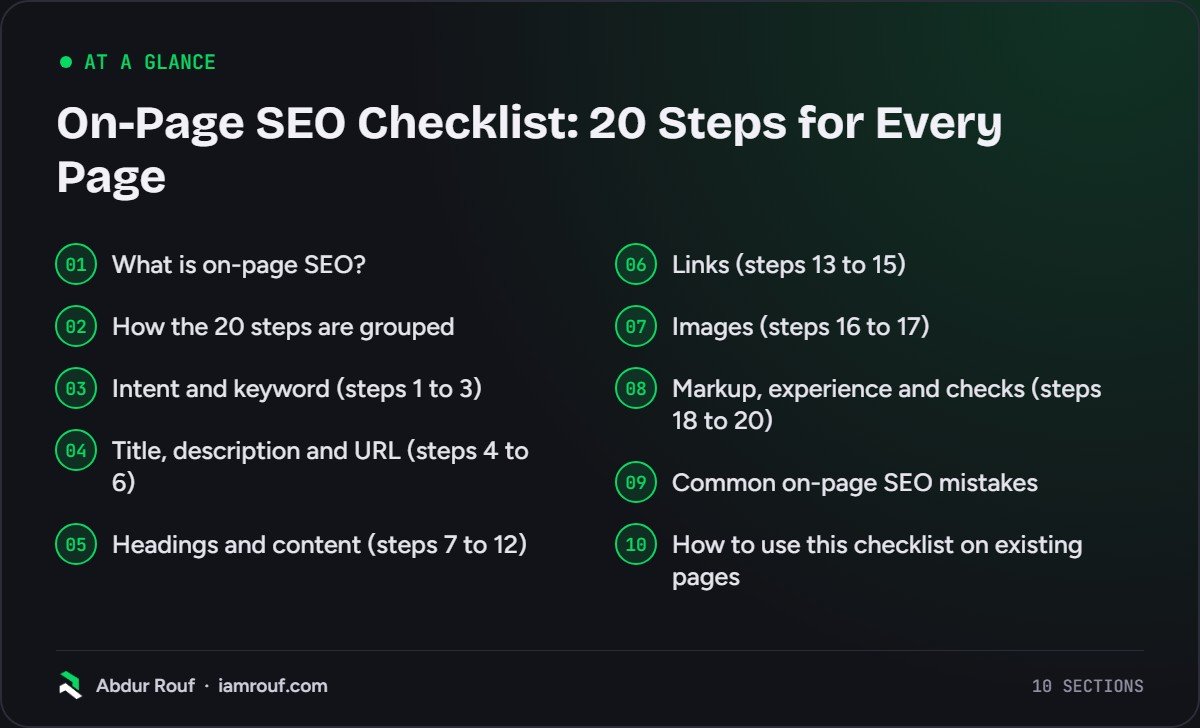
Use this table to jump to the part you need. If you are fixing an existing page rather than writing a new one, start at the group where you suspect the problem is.
| Group | Steps | The question it answers |
|---|---|---|
| Intent and keyword | 1 to 3 | Is this the right page for the search? |
| Title, description and URL | 4 to 6 | Will the result look clear and worth clicking? |
| Headings and content | 7 to 12 | Does the page answer the question well? |
| Links | 13 to 15 | Is the page connected to the rest of the site and the web? |
| Images | 16 to 17 | Can Google understand the images, and do they load fast? |
| Markup, experience and checks | 18 to 20 | Is the page eligible for rich results, pleasant to use and indexed? |
Intent and keyword (steps 1 to 3)
Get these wrong and the rest of the checklist will not save the page. A perfectly tagged page that answers the wrong question will not rank for the right one.
1. Give the page one main keyword
Decide the main search term this page should rank for, plus a few close variations. One page, one main topic. If two of your pages target the same term, they end up competing, and neither does as well as a single strong page would. If you have not picked your terms yet, my guide on how to do keyword research walks through the process.
2. Match the search intent
Search the keyword yourself and look at what ranks. Are the results guides, product pages, service pages, local listings or comparisons? That tells you what kind of page Google thinks searchers want. If the results are all how-to guides, a sales page will struggle, however well it is written. Match the format first, then aim to be the most useful version of it.
3. List the questions the page must answer
Note the subtopics and questions that keep appearing in the top results and in the People Also Ask box. These become your headings and FAQs. You do not need every variation of the keyword: the starter guide says Google’s language matching can connect a page to queries that do not use the exact words.
Title, description and URL (steps 4 to 6)
These three are what people see in the search result before they decide to visit. They are also among the quickest wins on an existing page.
4. Write a unique, descriptive title tag
Every page needs its own <title>. Put the main topic near the start, describe what the page offers and add your brand at the end if it fits. Google’s guide to title links says there is no limit on title length, but long titles are truncated to fit the device. It also warns against keyword stuffing, vague titles such as “Home” and the same boilerplate title on many pages. Google may show different text from your title if it finds these problems, so write one it has no reason to replace.
5. Write a meta description that earns the click
The meta description is a one or two sentence summary of the page. Google often builds the snippet from your page content instead, but a clear, specific description gives it a good option. Make it unique to the page, say what the reader gets and include the main keyword naturally. Avoid lists of keywords and vague marketing lines.
6. Keep the URL short and readable
Use a few descriptive words, lowercase, separated by hyphens: /on-page-seo-checklist/ rather than /?p=1234 or a long string of IDs. Google’s starter guide says words in the URL have hardly any effect beyond breadcrumbs, so do not stuff them. Readable URLs simply help people understand the link before they click. On an existing page, do not change a working URL just to tidy it, unless you add a permanent redirect.
Headings and content (steps 7 to 12)
This is the part that does most of the ranking work. It is also where most pages fall short, usually by being thin, vague or written for a search engine rather than a person.
7. Use one clear H1 that matches the topic
The H1 is the visible headline. It should say plainly what the page is about and agree with the title tag, even if the wording differs. The title link guide says Google looks at the main visible title and headings when it writes title links, so a clear, prominent H1 helps your title survive. If several headings look equally important, Google may pick the first one.
8. Answer the search in the opening
Give the direct answer in the first paragraph, in plain words, then explain what the rest of the page covers. Readers who only need the answer get it fast. Readers who need detail know where to find it. A long story before the answer sends people back to the results.
9. Structure the page with descriptive headings
Break the content into sections with H2s and H3s that say what each section covers. Use the words people search with, and phrase some headings as questions when that is how people ask. The starter guide says heading order does not matter for Google Search and there is no ideal number of headings. Keep a logical order anyway, because screen reader users rely on it.
10. Cover the topic properly, not to a word count
Write until the question is answered well, then stop. Explain the key terms, the steps, the options and the common mistakes. Add something of your own: a method, an example, a clear opinion. Google’s guidance on creating helpful, people-first content asks whether you are writing to a particular word count because you heard Google prefers one, and answers that it does not.
11. Show who wrote it and why it can be trusted
Add an author name with a short bio that explains their experience with the subject. Cite sources for facts and numbers. Google’s helpful content guidance sets out a “Who, How and Why” test: is it obvious who wrote the content, how it was made, and why it exists? A page that exists only to attract search visits fails the last question.
12. Keep the content accurate and current
Check facts, prices, screenshots and steps before you publish and whenever you review the page. Update the date only when you have changed the content in a meaningful way. Google’s helpful content questions specifically ask whether you are changing dates to make pages seem fresh when the content has not substantially changed.
Links (steps 13 to 15)
Links tell Google how your pages relate to each other and help it find new ones. The starter guide says the vast majority of new pages Google finds each day are found through links.
13. Link to the page from related pages
Every new page should get at least one link from an existing, relevant page on your site, ideally more. Add it from your pillar or category page and from older posts on the same topic. A page with no internal links pointing to it is an orphan page, and it is much harder for Google and visitors to find.
14. Link out from the page with descriptive anchor text
Link from this page to related pages where it helps the reader, especially to your service or product pages where it makes sense. Use anchor text that describes the target page, such as “local SEO checklist”, not “click here” or “read more”. Keep links as normal <a href> links so Google can crawl them.
15. Cite good external sources, and label paid links
Linking to an official or expert source for a claim helps readers check it. You do not need to nofollow every external link. Add rel="nofollow" to sources you do not trust, and rel="sponsored" to paid or affiliate links. Links in comments and other user content should carry rel="ugc" or nofollow.
Images (steps 16 to 17)
Images help people understand the page, and they can bring visitors from Google Images. They are also the most common reason a page loads slowly.
16. Give each image a descriptive file name and alt text
Name files in plain words, such as black-roller-blind-kitchen.jpg, not IMG00023.JPG. Write alt text that describes what the image shows and why it is there, in a short phrase. Alt text is what screen readers read aloud, and it is what Google uses as the anchor text when the image is a link. Do not fill it with keywords. Place images near the text they relate to.
17. Serve images at the right size and format
Resize images to the largest size they will actually display at, compress them, and use a modern format such as WebP or AVIF where your setup supports it. Use a standard <img> element (inside <picture> if you serve several versions), because Google does not index images set as CSS backgrounds. Lazy load images below the fold, but not the main image at the top of the page.
Markup, experience and checks (steps 18 to 20)
The last three steps make the page eligible for richer results, comfortable to use, and confirmed as indexed.
18. Add structured data that matches the page
Structured data gives Google explicit clues about what the page is: an article, a product, a local business, a recipe, a breadcrumb trail. Use the type that fits, fill in the required properties and only mark up content that is visible on the page. Google recommends JSON-LD where your setup allows it, and most SEO plugins add it for you. Test the page in the Rich Results Test. Valid markup makes a page eligible for rich results; it does not guarantee them.
19. Check the page experience
Open the page on a real phone. Text should be readable without zooming, buttons easy to tap and nothing should jump around as it loads. Avoid pop-ups that cover the content. Then run it through PageSpeed Insights. The Core Web Vitals targets on web.dev are measured at the 75th percentile of page loads. They are a Largest Contentful Paint within 2.5 seconds, an Interaction to Next Paint of 200 milliseconds or less and a Cumulative Layout Shift of 0.1 or less. Good scores help, but they will not make a weak page rank.
20. Confirm the page is indexable, then measure it
Check the page is not set to noindex, not blocked in robots.txt and has a canonical tag pointing to itself (or to the version you want indexed). Run it through the URL Inspection tool in Search Console and request indexing if it is new. After a few weeks, check the Performance report for the queries it appears for, its impressions and its click-through rate. Those numbers tell you which of the steps above to revisit.
Common on-page SEO mistakes
These are the problems I see most often when I review pages. Most of them take minutes to fix once you spot them.
- The same title on many pages. Usually a template default or a copied page that was never edited. Each page needs its own.
- Keyword stuffing. Repeating the keyword in every heading, alt text and paragraph makes the page worse to read, and Google’s spam policies cover it.
- Two pages chasing one keyword. Merge them or give each a distinct focus.
- Meta keywords. Google Search does not use the keywords meta tag, so time spent on it is wasted.
- New pages with no internal links. Publishing a post and never linking to it from anywhere else on the site.
- Thin service pages. A heading, two sentences and a contact form will not answer what a buyer wants to know.
- Huge images. A photo straight off a phone, scaled down by the browser, can be several times heavier than it needs to be.
- Changing URLs without redirects. Any links and rankings the old URL had are lost.
If a mistake shows up on every page, it is a template problem. Fix the template once rather than editing pages one by one.
How to use this checklist on existing pages
For a new page, run all 20 steps in order. For an existing site, you will not have time to do every page at once, so prioritise.
- Start with the pages that bring in enquiries or sales: your homepage, main service or category pages and best-selling products.
- Next, look in Search Console for pages with plenty of impressions but a low click-through rate. Steps 4 and 5 (title and description) often help these.
- Then review pages that rank on page two for terms you care about. Steps 2, 3 and 10 (intent and depth) are usually the gap.
- Finally, work through the rest of the site in batches, starting with fixes that live in templates.
If you are checking a whole site rather than one page, my SEO audit checklist covers on-page alongside indexing, technical health, content, links and local. For pages that target customers in a town or city, add the location-specific steps from my local SEO checklist.
FAQs
What are the most important on-page SEO factors?
Matching search intent and writing genuinely useful content matter most, because no amount of tagging fixes a page that answers the wrong question. After that, a clear unique title tag, descriptive headings, internal links to and from the page and a page that is indexable and pleasant to use on a phone. Meta descriptions and structured data mainly affect how the result looks, which affects clicks.
How many keywords should I target on one page?
One main keyword, plus its close variations and related questions. Google understands synonyms and related phrases, so you do not need a separate page for every wording. If two keywords need different content to answer them well, for example a guide and a price comparison, they usually deserve separate pages. If the same page would answer both, keep them together.
Is on-page SEO enough to rank?
Sometimes, for low-competition searches, especially local and long-tail ones. For competitive terms, on-page work gets you into contention but rarely wins on its own. The site also needs to be technically sound, and it usually needs links and mentions from other relevant sites. On-page is the part you fully control, which is why it is the best place to start.
How often should I review on-page SEO?
Run the checklist when you publish a page, and review your most important pages at least once or twice a year, or whenever their traffic drops. Also review a page when its facts change, such as prices, services or opening hours. Search Console’s Performance report is the quickest way to spot pages whose clicks or rankings are slipping.
Want your key pages checked properly?
Work through these 20 steps on your most important pages and you will fix most of what holds them back on the page itself. If you would rather have an experienced specialist review your pages and give you a prioritised list of changes, take a look at my SEO services.