 Abdur Rouf
An SEO audit checklist is a list of the things to inspect on a website to find what is stopping it from ranking in Google. This one has 40 checks in seven groups: indexing, technical health, on-page, content, links, local and user experience. Work through it in order, because a page Google cannot index cannot rank.
For each check you get what to look at, where to find it and what a pass looks like. Most of it needs only free tools: Google Search Console, a website crawler and PageSpeed Insights.
If you are short on time, do groups 1 and 2 first. They catch the problems that block everything else.
What an SEO audit checklist covers
A checklist tells you what to inspect. It does not decide for you which problems matter most on your site. That judgement comes after, when you turn the fails into a fix list (there is a short section on that near the end).
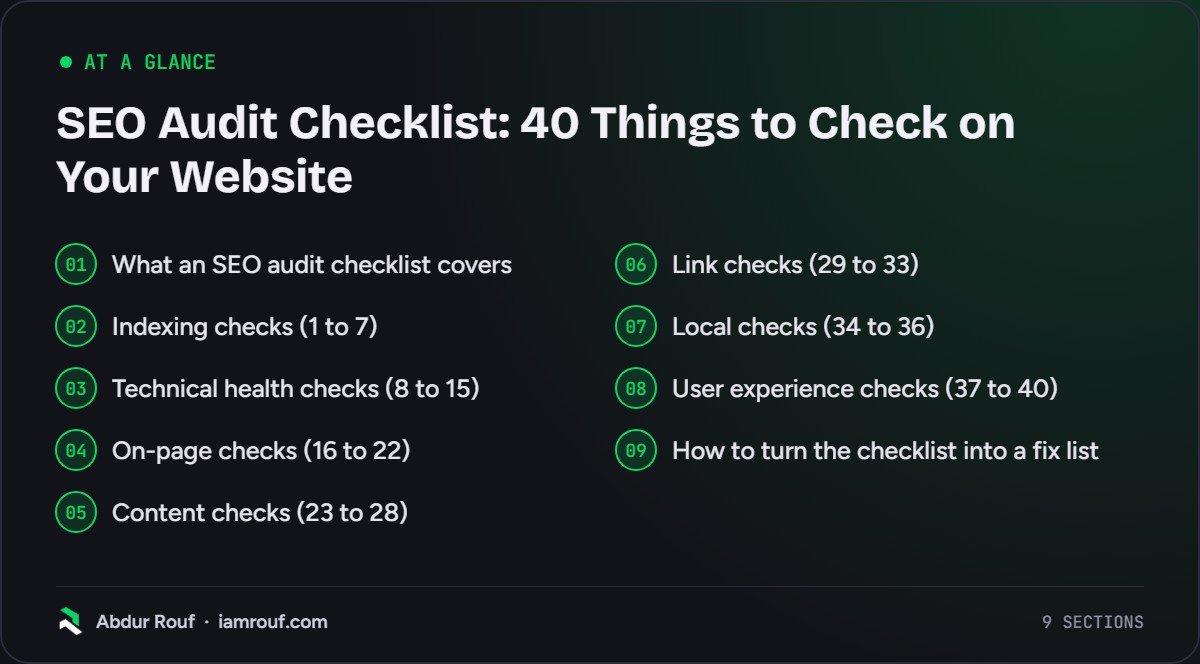
Here is how the 40 checks are grouped and where you will spend your time.
| Group | Checks | The question it answers | Main place to look |
|---|---|---|---|
| Indexing | 1 to 7 | Can Google find and store the pages that matter? | Search Console |
| Technical health | 8 to 15 | Does the site respond, load and render properly? | A crawler, PageSpeed Insights |
| On-page | 16 to 22 | Does each page say clearly what it is about? | A crawler, the page itself |
| Content | 23 to 28 | Is the content useful, current and not competing with itself? | Search Console, your own reading |
| Links | 29 to 33 | Do internal and external links support your key pages? | Search Console Links report, a crawler |
| Local | 34 to 36 | Can nearby customers find the business? | Google Business Profile |
| User experience | 37 to 40 | Is the site easy to use, and can you measure results? | A real phone, your analytics |
Indexing checks (1 to 7)
Start here. If Google has not indexed a page, nothing else on this list will help that page.
1. Your important pages are indexed
Open the Page indexing report in Search Console. It shows how many of your URLs Google has indexed and why the rest were not. Google’s Page indexing report documentation says most sites have at least a few unindexed pages and that this can be fine. What matters is that your homepage and key service, product and category pages are indexed. Google also notes that sites with fewer than 500 pages can often check with a site: search instead.
2. The “not indexed” reasons make sense
Read the “Why pages aren’t indexed” table line by line. “Alternate page with proper canonical tag” is usually expected. “Server error (5xx)”, “Soft 404” or “Crawled – currently not indexed” against pages you care about need a closer look.
3. Robots.txt is not blocking pages you want in search
Open yourdomain.com/robots.txt. Look for Disallow rules that cover folders you want to rank, or the CSS and JavaScript files your pages need to display. A leftover “Disallow: /” from a staging site blocks the lot.
4. Noindex tags are only where you meant them
Crawl the site and filter for pages with a noindex robots meta tag or X-Robots-Tag header. Then check each one was deliberate. One trap: Google’s guide to blocking indexing with noindex says the page must not be blocked by robots.txt, because Google has to crawl the page to see the tag.
5. Your XML sitemap lists only pages you want indexed
The sitemap should contain canonical URLs that return a 200 status and are indexable. Remove redirects, 404s and noindexed pages from it. Submit it in the Sitemaps report in Search Console and confirm it was read without errors.
6. Each page has one canonical version
HTTP and HTTPS, www and non-www, trailing slash and parameter versions should all resolve to one URL. Check that canonical tags point to the version you want. If the Page indexing report shows “Duplicate, Google chose different canonical than user”, Google has disagreed with your choice, so find out why.
7. There are no manual actions or security issues
Open the Manual actions and Security issues reports in Search Console. Both should show no issues detected. If either flags something, fix it before anything else on this list.
Technical health checks (8 to 15)
These checks look at how the site responds to crawlers and browsers. My technical SEO checklist covers each area in more depth if you need it.
8. The whole site runs on HTTPS
Every page should load over HTTPS with a valid certificate. HTTP versions should redirect permanently to HTTPS, and the browser should show no mixed content warnings.
9. Redirects are single hops
Your crawler’s redirect report will show chains (A to B to C) and loops. Point each old URL straight at its final destination. Use permanent redirects for permanent moves.
10. No internal links point to broken pages
Export every internal link that returns a 4xx status, along with the page it sits on. Fix the link at the source. Redirecting the dead URL is the backup plan, not the first fix.
11. Server errors are rare
Look for 5xx responses in your crawl and in the Page indexing report. A few during a busy crawl can be noise. A pattern means the server or hosting plan is struggling, and that is a conversation with your host or developer.
12. Soft 404s are fixed
A soft 404 is a page that looks empty or says “not found” but returns a 200 status. Either return a real 404 or 410 for pages that are gone, or put proper content on pages that should exist.
13. Core Web Vitals pass
Check the Core Web Vitals report in Search Console and the field data in PageSpeed Insights. web.dev’s Core Web Vitals guide sets the “good” thresholds at the 75th percentile of page loads. Largest Contentful Paint should be 2.5 seconds or less. Interaction to Next Paint should be 200 milliseconds or less, and Cumulative Layout Shift 0.1 or less.
14. Main content and links appear in the rendered page
If your site relies on JavaScript, compare the raw HTML with what the URL Inspection tool shows after rendering. Your main text, headings and navigation links should all be there. Links should be normal anchor tags with an href, not click handlers.
15. Structured data is valid and matches the page
Run key templates through the Rich Results Test. Fix errors first, then warnings on the types you care about. The markup must describe what a visitor can actually see on the page, not extra claims hidden in code.
On-page checks (16 to 22)
On-page checks are page by page. Run them on your most valuable pages first, then fix templates so new pages are right by default. For the full per-page routine, use my on-page SEO checklist.
16. Every page has a unique, descriptive title tag
Filter your crawl for missing, duplicate and very long titles. Each title should say what the page is about in plain words, lead with the main topic and end with your brand name if there is room.
17. Important pages have their own meta description
A meta description is your chance to shape the snippet people read before they click. Write unique ones for the homepage and your top pages first. Duplicates across hundreds of pages are worse than none.
18. Each page has one clear H1 and logical headings
The H1 should match the page’s purpose. H2s and H3s should break the page into sections a reader could scan, not be used for styling.
19. Each page targets one main topic and search intent
Write the main search phrase next to each important URL in a spreadsheet. If you cannot name one, or two pages share the same phrase, you have a targeting problem. Good keyword research fixes this before it starts.
20. URLs are short and readable
A URL like /roof-repairs/ tells a person and a search engine more than /page?id=4471. Do not change URLs on established pages just for neatness, though, as each change needs a redirect and carries risk.
21. Images have alt text and sensible file sizes
Describe what the image shows in its alt text. Compress large files and serve modern formats where your platform allows it. Oversized hero images are a common cause of slow loading.
22. Internal links use descriptive anchor text
Anchors such as “click here” or “read more” waste a signal. Use words that describe the target page, so readers and Google know what they will get.
Content checks (23 to 28)
Technical fixes get pages into the index. Content decides whether they deserve to rank once they are there.
23. No two pages compete for the same search
In the Search Console Performance report, filter by an important query and switch to the Pages tab. If several URLs share the impressions and swap places over time, consider merging them or giving each a distinct focus.
24. Thin pages are improved, merged or removed
List pages with very little useful content and no search traffic. Each one gets a decision: improve it, merge it into a stronger page with a redirect, or remove it. Do not delete pages that earn links or leads just because they are short.
25. Facts, prices and dates are current
Out-of-date opening hours, prices, staff names or “best of 2021” titles cost trust with readers. Update the substance, not just the date at the top of the post.
26. Pages show who wrote them and why they know
Readers should be able to see who is behind the content. Check for author names where readers would expect them, an about page and real contact details.
27. Each key page answers the search better than what ranks now
Search your main phrases and read the top results honestly. If your page is thinner, vaguer or older, that is a content gap, not a technical one.
28. Near-duplicate pages are dealt with
Location pages with only the town name swapped, tag archives that repeat category pages and printer-friendly copies all dilute a site. Consolidate them or make each one genuinely different.
Link checks (29 to 33)
Links help Google discover pages and judge which ones matter. Check the links you control first, then the ones pointing at you.
29. Every important page has internal links
Compare the URLs in your sitemap with the URLs your crawler found by following links. Pages in the sitemap but not in the crawl are orphans. Link to them from relevant pages.
30. Key pages are a few clicks from the homepage
Your crawler reports click depth for each URL. If a money page sits deep in the site, add links to it from the main navigation, hub pages or related posts.
31. Your backlink profile shows no obvious spam patterns
Export the Links report from Search Console and scan the top linking sites and anchor text. Google’s spam policies list link spam examples such as buying links for ranking purposes, excessive link exchanges and widely distributed footer links. Paid or sponsored links are fine when they are qualified with rel=”sponsored” or rel=”nofollow”. If your history includes these tactics, read why black hat SEO is dangerous before deciding what to do.
32. Outbound links work and go to useful pages
Your crawl will list external links that return errors. Fix or remove them. Link out where it helps the reader, such as a source for a claim.
33. Pages that earned backlinks still exist
In the Links report, check your top linked pages. If any now return a 404, redirect them to the closest relevant live page so visitors from those links land somewhere useful.
Local checks (34 to 36)
Skip this group if you only sell online. If customers visit you, or you travel to them, these three checks matter. The local SEO checklist goes further.
34. Your Google Business Profile is claimed and accurate
Check the business name matches the real-world name, the primary category fits your main service, and hours, phone and website are correct. My guide to optimising your Google Business Profile walks through each field.
35. Name, address and phone match everywhere
Compare your website footer, contact page, Google Business Profile and main directory listings. Old addresses and tracking numbers left on directories cause confusion for customers.
36. Each location or service area has a useful page
If you serve several towns, give each important one a page with real local detail: the jobs you do there, how to reach you, relevant photos. Avoid copy-and-paste pages.
User experience checks (37 to 40)
These checks are about the visitor once they arrive. They also make every other fix measurable.
37. The site works properly on a phone
Use your own phone, not just a desktop simulator. Check that text is readable without zooming, buttons are easy to tap, menus open and forms submit. Mobile content should match desktop content.
38. Pop-ups do not cover the main content
Full-screen offers that appear before someone can read anything frustrate visitors, especially on mobile. Delay them, shrink them or drop them.
39. Calls to action and contact details are easy to find
Every service page should make the next step obvious: call, book, buy or ask a question. If the contact form is three clicks away, you are losing enquiries from traffic you already have.
40. You can measure what visitors do
Check that analytics is installed on every template, that key actions (form submissions, calls, purchases) are tracked as conversions, and that Search Console is linked. Without this, you cannot tell whether the other 39 fixes worked.
How to turn the checklist into a fix list
An audit is only useful if it ends in a short, ordered list of jobs. Mark every check as pass, fail or not applicable, then sort the fails like this:
- Anything that stops important pages being crawled or indexed (checks 1 to 7).
- Site-wide problems in templates, such as titles, canonicals or slow loading, because one fix repairs many pages.
- Problems on the pages that bring in enquiries or sales.
- Content gaps and consolidation on pages with clear search demand.
- Link clean-up, local fixes and nice-to-haves.
Give each fail an owner and a rough effort level. Re-check the same items after the fixes go live, so you know they actually stuck.
FAQs
What should an SEO audit include?
A useful SEO audit covers indexing, technical health, on-page elements, content quality, internal and external links and, for local businesses, Google Business Profile and citations. It should also check user experience and tracking. Most importantly, it should end with a prioritised list of fixes, not just a long export of every warning a tool can find.
How long does an SEO audit take?
It depends on the size and complexity of the site. A small brochure site can often be checked against this list in a day or two of focused work. A large shop with thousands of URLs, filters and several templates takes much longer, mostly because the findings need more investigation before you can say what is causing them.
Can I do an SEO audit myself?
Yes, for most small sites. Search Console, a crawler and PageSpeed Insights cover the majority of the checks above, and many of the fixes are settings you can change yourself. Where people get stuck is interpreting findings and deciding what to fix first. That is when a second opinion from someone who audits sites regularly saves time.
What tools do I need for an SEO audit?
At minimum, Google Search Console for indexing, performance and links data, a crawler to see your site the way a search engine does, and PageSpeed Insights for loading and Core Web Vitals. Add your analytics tool to see what visitors do. Paid backlink and rank tracking tools help on larger projects but are not essential to start.
Want a second pair of eyes on your audit?
Work through the 40 checks and you will have a clear picture of what is holding your site back. If you would rather have an experienced auditor run them and hand you a prioritised fix list, take a look at my SEO audit and consultancy services.